How to play
Spindle.
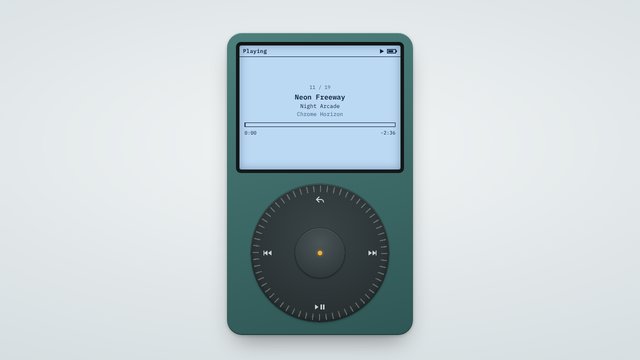
Spindle is a pocket music player you control with a spinning scroll dial. Browse 19 original tracks across 14 genres, add your own music and videos, and play three mini games.
- Chill
- Touch, Mouse, Keyboard
- About 5 min a round
- Free, no sign-up
How to play
- Drag your finger or mouse in a circle around the dial to scroll through the menus. Tap the centre button to choose.
- Tap the top of the dial to go back, the sides to skip tracks, and the bottom to play or pause.
- Open Library to browse by artist, album, genre or playlist, or pick Shuffle All for a random mix.
- On the Playing screen, spin the dial to change the volume. Tap the centre to switch to scrubbing, then spin to move through the track.
- Hold either side of the dial to rewind or fast-forward. The longer you hold, the faster it goes.
- Open Games and pick Wall Smash, Orbit or Snake. Spin the dial to steer and tap the centre to start or pause.
Controls
- Phone: drag around the dial to scroll, tap the centre to choose, and tap the dial's edges for back, skip and play.
- Computer: drag the dial with the mouse or use the scroll wheel. Up and Down scroll, Enter chooses, Esc goes back, Space plays or pauses, and Left or Right skip (hold them to rewind or fast-forward).
Tips
- Add your own MP3s or videos with the button under the player, or drop files onto the page. They stay on your device and are never uploaded.
- Try the playlists in Library for a mix of genres, from Chill Out to Dance Floor.
- To hear only your own music, go to Settings and turn Preloaded Music off.
Good to know
The built-in tracks are original pieces made live in your browser, from jazz and bossa nova to house, disco, reggae, synthwave and chiptune. Best scores in the mini games are saved on your device.
More games
- Still WaterChill
- SpillPuzzle
- M1 MayhemArcade
- Fruit SlicerArcade
- Crosswind HoopsSports
- Paper Plane CommuteArcade